Everybody knows that great artists steal. I even stole this post’s title from saasmarketer.io (dead now). So let’s try to figure out the answer to a most pressing question: what will you be stealing?
Working on your product can be exhausting. So why not get some help from your competitors? By tracking their posts you can get new ideas for your product and learn how they’re dealing with their problems. Track what their customers say, too: what they like, what frustrates them, and why they’re looking for something else.
Monitoring competitors
I noticed that every time someone mentions Syften on Reddit, some guy comments asking people to try NotifierForReddit:
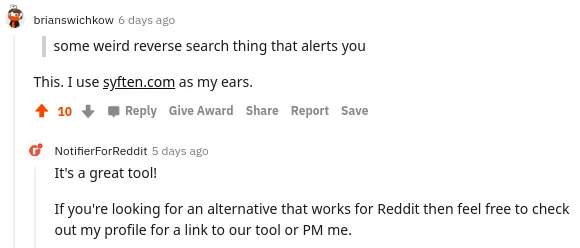
Every time!
I was curious about what else he was up to, so I listened to all of his posts:
notifierforreddit
author:notifierforreddit
Then one day I saw this ad:

Looks familiar? At the time, this was my landing page:
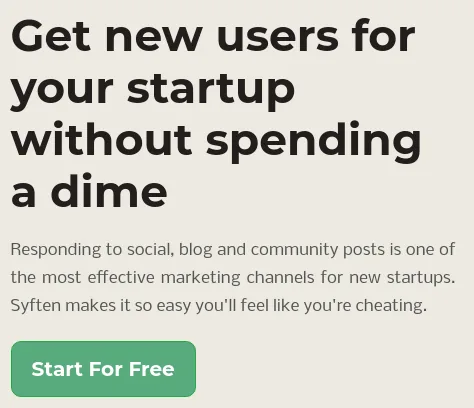
While I can’t say this is of any practical importance, it’s good to know what others are up to.
Learn about new players immediately
Naturally, I’m monitoring a bunch of topics related to social listening. One day this showed up:
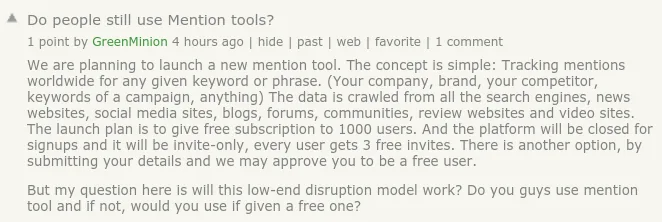
Maybe he knows something I don’t? Maybe we can work together? At the very least I can reach out.
Becoming a master of marketing
By monitoring all posts and comments by marketers better than me I’m able to build my own playbook. That’s also how I got some of my cool case studies.

Learning how Tom Hunt does it
To try this yourself, start with one competitor’s product name and domain. You can also follow individual accounts whose posts you find useful.
Monitor the product name and domain
People might name the product or just link to its website or documentation. In Setup → Communities → Filters, add a separate line for each. Here is an example using a generic product name and domain:
"competitor name" $tag:competitors
competitor.example $tag:competitors
Putting the name and domain on one line would require both to appear in the same item. Separate lines catch either. The domain filter also catches subdomains such as documentation links. The $tag:competitors tag lets you keep these alerts together when configuring delivery. These are community filters; Web and X/Twitter have separate filter syntax.
For content research, watch public web pages too. Our backlink opportunities guide shows how a link to a competitor's article can reveal a question worth answering yourself.
To follow someone’s Reddit posts and comments, add a separate filter with their username:
site:reddit.com author:competitor_account $tag:competitorsRemove recurring false matches
Preview the filters and look for patterns in the irrelevant results. Use NOT to exclude a recurring word or phrase. Keep genuine mentions of the product, even when they aren’t complaints or requests for alternatives.
If an account repeatedly posts irrelevant promotions, exclude it with NOT author: followed by its username, alongside a site: restriction for that community. For ambiguous names or context that is hard to express with keywords, you can let AI handle false matches for you before Slack and email notifications are sent. The filter guide has more examples.
Look for complaints you can do something about
A recommendation tells you what customers value. A complaint can reveal a missing feature, an awkward workflow, or someone actively looking to switch. The product-name filter is enough to find these conversations. Avoid requiring extra words like “alternative” or “not working”: people describe problems in many ways, and those restrictions would miss useful mentions. If the brand gets too many mentions to review, use AI filtering to keep only complaints, regardless of how people phrase them.
Read the thread before replying. Explain how to solve the actual problem, and mention your product only if it helps. A complaint about a feature you also lack is still useful product feedback. See how one such reply brought three paying customers.
Send alerts to someone who can act
In Setup → Slack or Setup → Email, choose the same tag as the filters you want delivered there. Choose competitors for the examples above, and send those alerts to whoever follows competing products and answers prospective customers.
Use immediate alerts for conversations you want to join, or a daily email for research you can review later. When a new match arrives, check that it appears in Setup → Results and reaches the intended destination.
Resources
- 8 Best Competitor Monitoring Tools in 2026. Tool stack guide.
- One Article, Two Days, 400 Newsletter Subscribers. Case study.
- Handling unsuccessful Reddit posts. What to learn from quiet posts and moderator removals.