X/Twitter is fast, noisy, and unusually useful when you catch the right post early. The valuable posts are not only tagged brand mentions. They are untagged complaints, competitor comparisons, category questions, launch replies, quote posts, founder mentions, and short posts where someone asks the timeline what to use.
That is why the best Twitter monitoring tool is not always the largest social listening suite. For X/Twitter, precise queries, fast alerts, noise reduction, and team delivery matter more than a beautiful dashboard. A monitoring setup is only useful if the right post reaches the right person while liking, reposting, replying, or escalating still matters.
A raw X search is a good reminder of the problem. Without the ranking algorithm and without careful filters, a broad brand query quickly turns into promotional posts, official-account updates, link-heavy posts, and barely related matches:
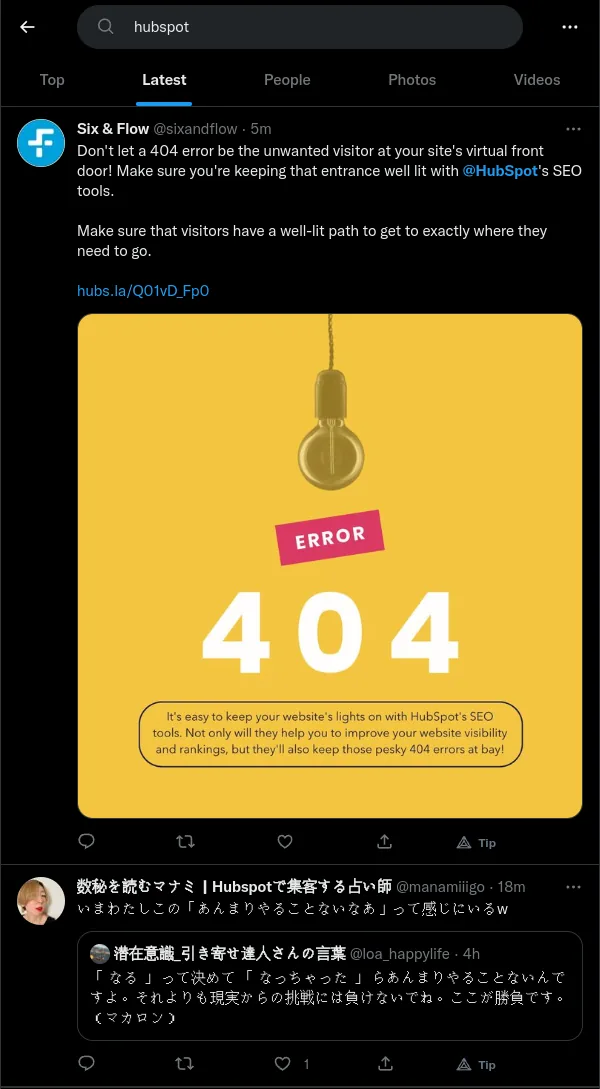
A broad X/Twitter search can look busy while still being weak as a monitoring workflow.
Even after basic cleanup, some spam still gets through. That is why this comparison gives real weight to exclusions, native X query syntax, and AI post-filtering rather than only counting which tools claim to support Twitter monitoring.
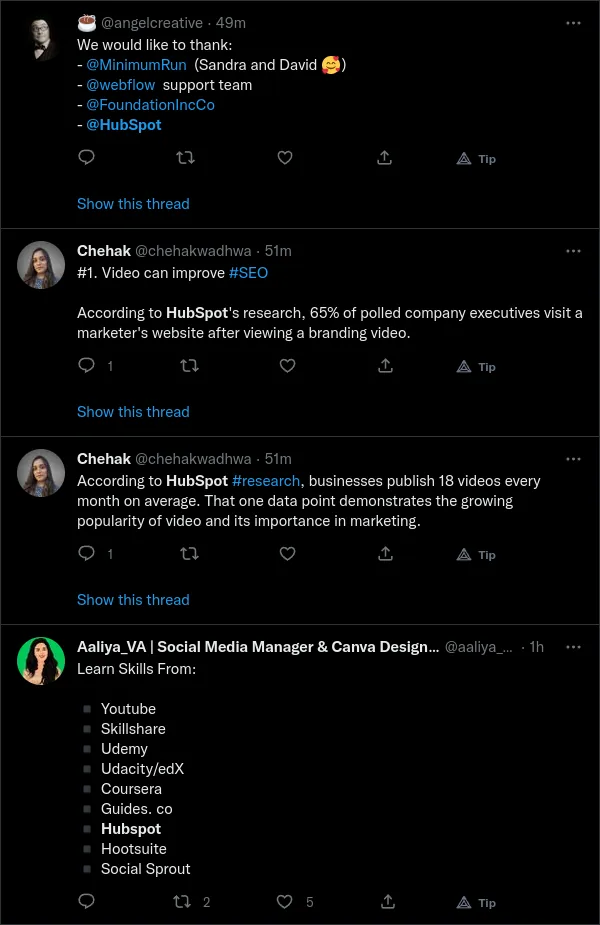
Keyword filtering is useful, but noisy X/Twitter terms often need another layer of filtering.
This guide compares Twitter and X monitoring tools in 2026. It includes dedicated Twitter alert tools, broad social listening suites, social media management platforms, and analytics products that people often compare when choosing a way to track X. The question is deliberately narrow: which tool is best when your main job is catching relevant X/Twitter posts and getting them into a workflow?
The quick verdict below gives the ranked answer first; the individual writeups explain fit, tradeoffs, and when a broader suite is a better choice.
Quick verdict and X Monitoring Score
Syften is the best choice for alert-first X/Twitter monitoring. It is built around precise keyword alerts, not social publishing. You can use native X/Twitter search syntax, add AI accept/reject filtering for noisy matches, and route useful posts to Slack, email, Zapier, webhooks, or API.
The Slack workflow matters. Many teams do not monitor X only to reply from one official account. They want a shared channel where teammates can see relevant posts, like them, repost them, reply from personal accounts, or hand them to sales, support, community, or founders. That is a different job from quarterly social listening reports.
To make the comparison concrete, I use a 100-point X Monitoring Score. It rewards tools that help you find useful X/Twitter posts, suppress false positives, and deliver alerts where the team can act. It does not reward publishing, scheduling, ad management, or broad social media reporting unless those features improve the monitoring workflow.
| Criterion | Weight | What it measures |
|---|---|---|
| Query precision | 25 | Native X syntax, exact phrases, OR groups, exclusions, account filters, language filters, links, media, replies, quotes, and retweets. |
| Noise reduction | 20 | AI post-filtering, spam filtering, false-positive control, and the ability to keep broad queries useful. |
| Alert delivery | 20 | Fast alerts through Slack, email, Zapier, webhooks, API, or another destination your team already checks. |
| Team amplification workflow | 15 | How well the tool sends posts to a team channel where people can like, repost, reply, or discuss quickly. |
| Monitoring focus | 10 | Whether the product is built for finding relevant posts, not mainly publishing, scheduling, or analytics. |
| Setup transparency | 10 | Readable queries, clear setup, understandable matching, and a buying path that does not hide the workflow. |
The matrix below is intentionally short. The individual writeups cover the details and tradeoffs.
| Tool | Score | Best for | Why |
|---|---|---|---|
| Syften | 98 | Real-time X alerts | Native X syntax, AI filtering, Slack delivery, and alert-first workflows. |
| Twilert | 82 | Dedicated Twitter alerts | Focused on X/Twitter search alerts, but less broad as a team monitoring system. |
| Mention | 74 | Enterprise social intelligence | Managed social listening and reporting; too expensive for simple X alerts. |
| Brand24 | 72 | Brand monitoring dashboards | Useful for mention tracking, sentiment, reporting, and multi-source brand monitoring. |
| X Pro | 70 | Manual live monitoring | Good native columns for people who live inside X, but weak for automated team alerts. |
| Sprout Social | 68 | Social operations | Strong when monitoring is tied to publishing, inbox, care, and reporting. |
| Hootsuite | 66 | Social media teams | Useful streams, inbox, and analytics when X is one channel inside a larger workflow. |
| Brandwatch | 65 | Enterprise intelligence | Powerful research and reporting platform, but heavier than most alerting workflows need. |
| Talkwalker | 63 | Global social listening | Better for analysis, sentiment, and trend reporting than lean alert workflows. |
| Meltwater | 61 | PR and media monitoring | Fits communications teams that need X inside a wider media intelligence platform. |
| Agorapulse | 60 | Agency social workflows | Helpful social inbox and publishing platform with monitoring as one capability. |
| Mentionlytics | 58 | SMB brand monitoring | Good for general brand monitoring, sentiment, competitors, and reports. |
| Audiense | 54 | Audience intelligence | Useful for understanding X audiences, but not a pure real-time alert tool. |
How I evaluated these tools
I evaluated each tool by the parts of X/Twitter monitoring that decide whether alerts become useful or get ignored: query precision, speed, noise control, delivery, Slack workflow, team amplification, and whether the product is actually built for monitoring.
The feature notes were last reviewed in May 2026. X/Twitter data access, pricing, and API rules change often, so check each vendor before buying. This article is not trying to rank every social media tool. It is ranking tools for one job: finding relevant X/Twitter posts and getting them to the people who can act on them.
| Criterion | Why it matters for X/Twitter | What to check before choosing a tool |
|---|---|---|
| Native search syntax | X search is powerful when you can use phrases, exclusions, account filters, language, links, media, replies, quotes, and retweets. | Can the tool accept the same kind of query you would use in advanced X search? |
| Untagged mentions | People often mention a brand, domain, founder, or competitor without using the handle. | Can you track names, domains, and phrases, not just @mentions? |
| Noise control | Broad X searches catch spam, reposts, official posts, low-effort replies, and unrelated meanings. | Can you exclude junk and add AI filtering after the first match? |
| Alert speed | A like, repost, reply, or sales handoff matters most while the post is fresh. | Are alerts fast enough for launch posts, support issues, and active conversations? |
| Slack delivery | Teams often need a shared place to review, amplify, and assign posts. | Can relevant matches go to Slack channels, and can different filters route to different channels? |
| Workflow fit | A dashboard nobody checks is worse than a plain alert in the right channel. | Does the tool fit how your team actually replies, reposts, escalates, and reports? |
Tools I did not rank
I did not rank every product that appears in Twitter tool roundups. Some are mainly scheduling tools, analytics tools, link shorteners, content creation tools, influencer tools, or ad research products. Those can be useful, but they do not solve the core monitoring job.
I also left out tools where the public positioning is too far from alert-first X monitoring. For example, Buffer, Later, Planable, SocialBee, Sendible, Followerwonk, Minter.io, Google Alerts, BuzzSumo, Statusbrew, YouScan, Khoros, Sprinklr, Rival IQ, Emplifi, Juphy, and Hootsuite's content tools can be useful in adjacent workflows, but I would not put all of them in the main ranked list for X keyword alerts.
The main list is focused on tools that best match the alert, filtering, and team workflow criteria above. Hashtag analytics tools, lightweight keyword widgets, and tools with unclear current X monitoring workflows are better handled as adjacent options, not as primary recommendations.
Short answers
What is the best Twitter monitoring tool?
For real-time X/Twitter alerts, Syften is the best fit because it supports native X search syntax, AI post-filtering, and Slack delivery for team workflows. It is especially useful when you care about untagged mentions, competitor tracking, launch amplification, sales signals, or support issues.
What is the best tool for Slack alerts from X/Twitter?
Syften is the strongest fit when X/Twitter alerts need to land in Slack. You can route different filters to different Slack channels, so founder mentions, launch posts, competitor comparisons, support issues, and team amplification posts do not all end up in the same stream.
Can X Pro replace a Twitter monitoring tool?
X Pro is useful for manual monitoring if someone is watching columns during the day. It is not a full replacement for automated alerts because it does not route filtered matches into Slack, email, API, or webhooks for a team workflow.
Should I choose a social listening suite instead?
Choose Brandwatch, Talkwalker, Meltwater, Sprout Social, Hootsuite, or another broad suite when you need dashboards, sentiment reporting, executive summaries, publishing, inboxes, or PR workflows. Just treat sentiment as a rough reporting layer unless the tool explains what brand or product the score is actually about. Choose Syften when the job is simpler and more urgent: find the right X posts and send them to people who can act.
What should I track on X/Twitter?
Track your handle, brand name, product name, domain, founder names, competitor names, competitor domains, category phrases, alternative-seeking phrases, support keywords, and launch terms. The B2B SaaS brand monitoring guide goes deeper on which identifiers are genuinely separate and which URL variants are already covered by the main brand term. Then exclude your own posts, retweets, low-value languages, spam patterns, and unrelated meanings.
Twitter monitoring, social listening, social media management, and X analytics are not the same thing
Most Twitter tool lists mix several categories together. That makes the recommendations muddy. A tool can be excellent for scheduling or analytics and still be weak for alerting. Another tool can be excellent for market research and still be too heavy for a founder who just wants relevant posts in Slack.
| Category | Main job | Good when | Not enough when |
|---|---|---|---|
| X/Twitter monitoring | Alert me when public posts match my keywords, accounts, competitors, domains, or intent phrases. | You want to reply quickly, amplify posts, support customers, or spot sales signals. | You mainly need reports, publishing, or historical audience research. |
| Social listening | Analyze conversations across many channels and report on volume, sentiment, trends, and brand health. | X is one source inside a broad intelligence workflow. | You need a lean real-time alerting workflow. |
| Social media management | Schedule posts, manage inboxes, collaborate, and report on social performance. | The team publishes and replies across many networks. | Your main job is catching third-party posts before they go stale. |
| X analytics | Measure performance of your own X account and content. | You want to improve posting strategy or report on engagement. | You need to find posts from people who did not tag you. |
What makes a Twitter monitoring tool good?
X/Twitter monitoring is not just counting mentions. You are trying to notice the posts that deserve action while they are still alive. The best tools are the ones that reduce manual checking without flattening all signals into a dashboard.
For that, judge tools on these criteria:
- Native X query support. You need phrases, OR, exclusions, account filters, language filters, and operators such as
-is:retweet - AI filtering. Keyword filters catch candidates; AI filtering can reject weak matches before they interrupt the team.
- Slack delivery. Important posts should land where people already coordinate.
- Team amplification. A useful workflow makes it easy for teammates to like, repost, reply, or discuss the post quickly.
- Competitor and domain tracking. B2B mentions often use a competitor name, domain, founder name, or category phrase instead of your exact handle.
- Workflow delivery. Alerts should go to Slack, email, Zapier, API, or webhooks, not only a dashboard someone has to remember to check.
13 best Twitter monitoring tools in 2026
1. Syften: best for real-time X/Twitter alerts
Syften is the best fit when X/Twitter monitoring is a live workflow. It supports native X/Twitter search syntax, so you can write precise searches with phrases, OR groups, exclusions, account filters, language filters, retweet filters, reply filters, quote filters, media filters, links, hashtags, and handles.
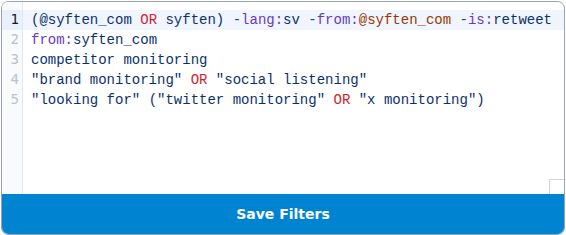
Syften lets you write precise X/Twitter searches and route matching posts into your alert workflow.
The differentiator is what happens after the keyword match. Syften can apply AI accept/reject filtering before sending Slack or email notifications. That means you can monitor broader phrases, then suppress spam, weak matches, and posts that technically match but do not fit the use case.
Syften is also strong for team amplification. Send launch mentions, founder posts, customer praise, competitor comparisons, or category questions into a Slack channel, and the team can like, repost, reply, or hand off while the post is still fresh. Use tags when different filters should go to different channels.
Best for: founders, marketers, agencies, support teams, and B2B software teams that want high-signal X/Twitter alerts in Slack.
Tradeoff: Syften is not trying to be a publishing suite or executive social listening dashboard. Use it when alerts and action matter more than broad reporting.
X monitoring is a $40/month add-on to Standard and PRO subscriptions, with up to 65 filters and 1,000 tweets per calendar month. You can adjust the daily soft quota and authorize overage at $0.04 per additional tweet in Setup → Twitter → Quotas. AI-rejected posts still use the allowance. See the base plan prices.
| Characteristic | Support |
|---|---|
| Native X search syntax | Yes |
| AI filtering after the match | Yes |
| Alert delay | Up to 15 minutes, plus any email digest delay |
| Send alerts to Slack | Yes |
| API or webhooks | Yes |
| Needs someone watching a dashboard | No |
2. Twilert: best dedicated Twitter alert alternative
Twilert is a focused Twitter monitoring product built around saved searches and alerts. It is a natural comparison point if you want something more specialized than a broad social media suite.
It is strongest for teams that want X/Twitter alerts without buying an enterprise platform. Compare it carefully against Syften if Slack routing, AI filtering, multi-community monitoring, API delivery, or broader team workflows matter.
Best for: teams that want a Twitter-specific alert tool.
| Characteristic | Support |
|---|---|
| Native X search syntax | Mostly |
| AI filtering after the match | Undocumented |
| Alert delay | 5 minutes on near-real-time plans; otherwise scheduled |
| Send alerts to Slack | Undocumented |
| API or webhooks | JSON/RSS/Atom feeds |
| Needs someone watching a dashboard | No |
3. Mention: best enterprise social intelligence workflow
Mention is no longer a low-cost self-serve mentions inbox. Its current public pricing points new customers to a Company plan starting at $599/month on annual billing, with demo-led buying, reporting, collaboration, integrations, onboarding, and account support.
For X/Twitter, Mention is worth evaluating when X is one source inside a broader brand or social intelligence program. It is not the cleanest choice if your only job is precise X search, AI filtering, and routing posts into Slack. Syften is the better fit when the X query itself and the action workflow are the main differentiators.
Best for: PR, brand, agency, and social intelligence teams that can justify a managed monitoring workflow.
| Characteristic | Support |
|---|---|
| Native X search syntax | Partial |
| AI filtering after the match | Undocumented |
| Alert delay | Real time |
| Send alerts to Slack | Yes |
| API or webhooks | Yes |
| Needs someone watching a dashboard | No |
4. Brand24: best brand monitoring dashboard for smaller teams
Brand24 is a popular brand monitoring dashboard with mention tracking, sentiment-style reporting, alerts, source analysis, and AI-assisted insights. It is useful when X/Twitter is one source inside a wider brand monitoring project.
Choose Brand24 when you want dashboards and reports for brand health. Choose Syften when the job is more operational: find relevant posts, filter noise, and send the good ones to Slack.
Best for: marketing teams that want accessible brand monitoring and reporting.
| Characteristic | Support |
|---|---|
| Native X search syntax | Partial |
| AI filtering after the match | Yes, in dashboard |
| Alert delay | Real time |
| Send alerts to Slack | Yes |
| API or webhooks | Analytics API only |
| Needs someone watching a dashboard | No |
5. X Pro: best native manual monitoring
X Pro, formerly TweetDeck, is useful when someone wants to watch multiple X columns directly. You can keep an eye on accounts, lists, mentions, searches, and live activity from the native X environment.
The limitation is that it is still a manual workspace. It is good during events, launches, or daily community work when a person is watching. It is weaker when alerts need to wake up a team, route to Slack, or pass through AI filtering.
Best for: social operators who actively monitor X in real time.
| Characteristic | Support |
|---|---|
| Native X search syntax | Yes |
| AI filtering after the match | No |
| Alert delay | Live while open |
| Send alerts to Slack | No |
| API or webhooks | No |
| Needs someone watching a dashboard | Yes |
6. Sprout Social: best when monitoring is tied to social operations
Sprout Social combines publishing, engagement, analytics, customer care, and listening. It makes sense when a social team needs one place to plan posts, manage replies, report performance, and monitor public conversations.
For X/Twitter monitoring alone, Sprout can be heavier than necessary. It is a good fit when the team already wants the broader social operations suite. It is less direct when the core job is getting high-signal X posts into Slack quickly.
Best for: social media teams with publishing, inbox, analytics, and care workflows.
| Characteristic | Support |
|---|---|
| Native X search syntax | Partial |
| AI filtering after the match | AI summaries only |
| Alert delay | Real-time for X listening |
| Send alerts to Slack | Yes, if Slack notifications are enabled |
| API or webhooks | Limited; no X listening API |
| Needs someone watching a dashboard | Usually |
7. Hootsuite: best broad social media workflow
Hootsuite is an all-in-one social media management platform with scheduling, analytics, inboxes, streams, and listening-related features. It is useful when X/Twitter is one channel among LinkedIn, Instagram, TikTok, Facebook, YouTube, and other networks.
Hootsuite is strongest when the same team creates content, replies to comments, watches streams, and reports performance. For alert-first X monitoring, it is usually broader than needed.
Best for: teams that want monitoring alongside scheduling and analytics.
| Characteristic | Support |
|---|---|
| Native X search syntax | Yes |
| AI filtering after the match | AI analysis only |
| Alert delay | Live streams while open |
| Send alerts to Slack | Manual share only |
| API or webhooks | Undocumented |
| Needs someone watching a dashboard | Yes |
8. Brandwatch: best enterprise social intelligence platform
Brandwatch is a serious enterprise social intelligence platform. It is strong for large-scale consumer research, trend analysis, sentiment reporting, dashboards, audience analysis, and executive reporting.
For X/Twitter monitoring, Brandwatch makes sense when the organization needs the full intelligence layer. It is usually overkill if the actual job is "send relevant X posts to Slack so the team can act today."
Best for: enterprise research, social intelligence, and brand health reporting.
| Characteristic | Support |
|---|---|
| Native X search syntax | Partial |
| AI filtering after the match | Yes, via classifiers |
| Alert delay | Real-time Signals |
| Send alerts to Slack | Undocumented |
| API or webhooks | Yes |
| Needs someone watching a dashboard | Usually |
9. Talkwalker: best for global social listening
Talkwalker is built for large social listening and consumer intelligence workflows. Its strengths include broad coverage, multilingual analysis, dashboards, sentiment, trend detection, visual listening, and enterprise reporting.
Those strengths matter when X/Twitter is part of a global brand or research program. They matter less when you need a lean tool for keyword alerts and team amplification.
Best for: global brands and teams that need social listening reports.
| Characteristic | Support |
|---|---|
| Native X search syntax | Partial |
| AI filtering after the match | AI analysis only |
| Alert delay | Real-time alerts |
| Send alerts to Slack | Yes |
| API or webhooks | Yes |
| Needs someone watching a dashboard | Usually |
10. Meltwater: best for PR and media intelligence teams
Meltwater is strongest when X/Twitter monitoring belongs inside PR, media monitoring, journalist tracking, news coverage, and communications reporting. It can make sense for teams that want social, news, and media intelligence in one platform.
For X-only alerts, the platform can be more complex and expensive than needed. Use it when communications reporting matters as much as the alert itself.
Best for: PR teams and companies that monitor X alongside news and media coverage.
| Characteristic | Support |
|---|---|
| Native X search syntax | Partial |
| AI filtering after the match | AI alerts, not post filtering |
| Alert delay | Real-time alerts |
| Send alerts to Slack | Yes |
| API or webhooks | Yes |
| Needs someone watching a dashboard | No for alerts |
11. Agorapulse: best for agency social inbox workflows
Agorapulse is a social media management platform with publishing, inbox, reporting, collaboration, and listening features. It is a practical fit for agencies and teams that manage ongoing social operations.
For X/Twitter monitoring, Agorapulse is strongest when the next step is a reply, assignment, report, or client workflow inside a broader social media process. It is not as specialized as Syften for precise query-based alerts.
Best for: agencies that need inbox, publishing, and reporting around social channels.
| Characteristic | Support |
|---|---|
| Native X search syntax | Partial |
| AI filtering after the match | No |
| Alert delay | Real-time listening; synced limits apply |
| Send alerts to Slack | Workflow alerts only |
| API or webhooks | Undocumented |
| Needs someone watching a dashboard | Usually |
12. Mentionlytics: best SMB brand monitoring option
Mentionlytics is a brand monitoring and social listening tool aimed at teams that want mentions, sentiment, competitor tracking, influencer discovery, and reporting. It is a reasonable option when X is one of several places you monitor for reputation and marketing signals.
It is less compelling as a pure alerting tool if the main requirement is native X search precision, AI post-filtering, and Slack amplification.
Best for: SMBs and agencies that want general brand monitoring.
| Characteristic | Support |
|---|---|
| Native X search syntax | Undocumented |
| AI filtering after the match | AI analysis only |
| Alert delay | Instant and scheduled alerts |
| Send alerts to Slack | Yes |
| API or webhooks | Yes |
| Needs someone watching a dashboard | No for alerts |
13. Audiense: best for X audience intelligence
Audiense is not a pure Twitter monitoring tool. It is better understood as an X audience intelligence and segmentation platform. That makes it useful when you want to understand who follows, engages, or clusters around a topic.
Use Audiense for audience research, campaign planning, and segmentation. Use Syften when you need ongoing alerts for posts the team should act on.
Best for: marketers who need audience intelligence more than live alerts.
| Characteristic | Support |
|---|---|
| Native X search syntax | Partial |
| AI filtering after the match | No |
| Alert delay | Not an alert tool |
| Send alerts to Slack | No |
| API or webhooks | Undocumented |
| Needs someone watching a dashboard | Yes |
How to set up X/Twitter monitoring well
Start with four groups of searches:
- Your identifiers. Handle, product name, company name, domain, founder names, common abbreviations, and misspellings.
- Your competitors. Competitor names, domains, handles, founder names, and comparison phrases.
- Buying intent. Phrases like "alternative to", "recommend a", "what do you use for", and "best tool for".
- Amplification targets. Launch posts, customer praise, founder posts, partner posts, press mentions, and category discussions your team should help boost.
| Filter type | Example X query | Why it works |
|---|---|---|
| Tagged and untagged mentions | | Catches handle mentions, name mentions, and domain mentions. |
| Exclude your own posts | | Keeps owned posts out of the alert stream. |
| Remove retweets | | Reduces duplicate amplification noise. |
| Competitor alternatives | | Finds people comparing options or looking to switch. |
| Category questions | | Finds buying-intent posts where people ask for suggestions. |
| Team amplification | | Sends important posts to Slack so teammates can like or repost quickly. |
| AI-filtered broad topic | | Lets you monitor a broad category while suppressing weak matches. |
The handle is necessary, but it is not enough. In our archive analysis, 31.2% of brand and product mentions had no account handle anywhere in the tweet. That is why the first row combines the handle, brand name, and domain instead of relying on @yourhandle
The exact query matters less than the habit. Start broad, inspect matches, subtract obvious junk, and route the remaining useful posts to the place where action happens. For a deeper walkthrough, read how to find and track mentions on Twitter.
From a filter to an alert
In Setup → Twitter, save one filter per line in the Filters tab. For example, this filter watches our product name, handle, and linked domain while excluding our posts, retweets, and Swedish-language matches:
(syften OR @syften_com OR url:syften.com) -from:syften_com -is:retweet -lang:sv $tag:brandOpen Setup → Slack to install the app and select a channel with the brand tag. Or choose Send immediately or a digest in Setup → E-Mail. Use the same brand tag on the destination; all receives matches from every filter.
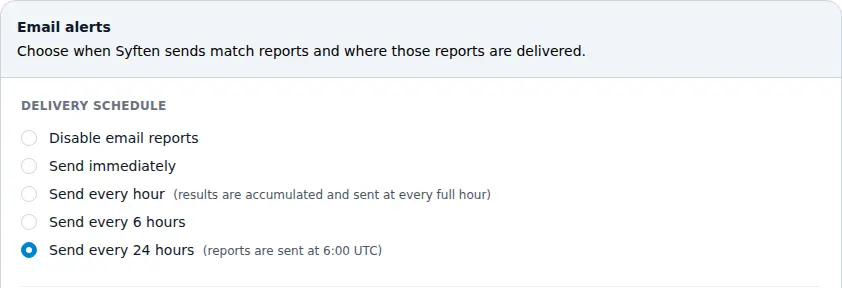
X matches use the same email delivery settings as other Syften alerts.
Final recommendation
If you need enterprise dashboards, sentiment reporting, visual listening, PR reporting, or a social media publishing suite, evaluate Brandwatch, Talkwalker, Meltwater, Sprout Social, Hootsuite, Agorapulse, and the other broad platforms.
If you specifically want to know when someone on X/Twitter mentions your brand, asks for a tool, compares competitors, talks about your category, or posts something your team should amplify, use Syften. It is the most direct fit because it combines native X search syntax, AI filtering, and delivery to Slack or other workflows.
Start with Syften's X/Twitter monitoring page or create an account and set up your first filters.