For keyword alerts from public GitHub comments, Syften is a strong fit. For @mentions and updates to issues or GitHub Discussions you follow, start with GitHub's own notifications. The useful distinction is whether you need to discover a product mention in an unfamiliar repository or keep up with a conversation you already know about. For automatic keyword searches of Discussion titles and bodies, compare Mentionkit.
This guide compares those workflows, shows real public mentions, and walks through a setup for a developer-tool team. I make Syften; the GitHub, Mentionkit, and Octobox comparisons use their published documentation, checked on October 22, 2026. The examples below come from Syften's archive.
Choose a tool around the mention you need to catch
| Tool or workflow | Choose it for | Important limit |
|---|---|---|
| Syften | Product, competitor, package, or error keywords in public GitHub comments, including repositories you do not watch. | Hourly collection of supported comment types; no GitHub Discussions or private repositories. |
| Mentionkit | Scheduled public keyword searches including issue and pull request titles and bodies, Discussion titles and bodies, and README matches. | Documents a 12-hour schedule; verify comment coverage rather than assuming every reply is included. |
| GitHub notifications | Personal @mentions and updates to subscribed issues, pull requests, and Discussions. | Follows your subscriptions and participation; it is not a global brand-keyword alert. |
| GitHub search | Manually finding product names in issue and Discussion titles, bodies, and comments. | A search query needs revisiting; running it does not create an ongoing keyword alert. |
| GitHub's Slack integration | Sending selected activity from known repositories to a team channel. | Repository subscriptions and event settings determine what arrives. |
| Octobox | Searching, filtering, and triaging an overloaded GitHub notification inbox. | Organizes GitHub notifications rather than discovering brand keywords across unrelated repositories. |
An @mention targets a GitHub account or team. A keyword mention can simply name your product, package, domain, or error message without tagging anyone. For a developer-tool company, both matter: native notifications keep the team involved in its own threads, while keyword alerts can uncover integration problems and comparisons elsewhere.
If the job is managing a backlog, use an issue tracker or project board. For example, Linear's GitHub integration supports issue syncing and status automation. That serves a different need from discovering public mentions of your product.
Syften: keyword alerts from public comments
Syften scans public GitHub issue comments, pull request review comments, and commit comments every hour. Ordinary comments on pull request conversations are included under issue comments. You can match keywords across the supported public stream without choosing every repository in advance, or use a repository path to narrow the rule. Read the GitHub coverage documentation for the exact limits.
Syften does not monitor GitHub Discussions, newly opened issue titles and bodies, README changes, repository code, or private repositories. A conversation inside an issue is not the same surface as GitHub's separate Discussions feature.
That makes Syften useful for public support signals, integration feedback, and competitor mentions in comments. Use native GitHub notifications alongside it for repositories your team maintains and threads where complete follow-up matters. The GitHub keyword alerts page covers the product overview.
Syften collected 423,224 public GitHub comments over the last 30 days, from Sep 24 to Oct 23 (UTC). The daily counts below come from the same archive used for keyword matching and previews.
Mentionkit: scheduled searches of Discussion titles and bodies
If automatic discovery in GitHub Discussions is essential, compare Mentionkit's documented GitHub coverage. It lists public issue and pull request titles and bodies, Discussion titles and bodies, repository and README matches, and topics. It runs an initial search when a keyword is added, then checks every 12 hours.
The page lists $49 per month for 10 keywords. Confirm whether the specific comments and replies you care about are covered; its Discussion description specifies titles and bodies. It excludes private repositories, source code, and commits.
GitHub notifications: follow issues, Discussions, and @mentions
For a repository you maintain or follow, open its Watch menu, choose Custom, and select the events you need, including Issues and Discussions where available. GitHub can deliver notifications through its inbox, email, and mobile app. Its notification settings documentation explains repository subscriptions and personal @mentions.
GitHub search: find mentions in titles, bodies, and replies
For product names in repositories you have not discovered yet, use GitHub search as a manual complement. Search Issues for:
is:issue meilisearch in:title,body,comments
Then select Discussions in GitHub search and run:
meilisearch in:title,body,comments
These searches include opening text as well as comments. Add repo:owner/repo when you want one repository, and revisit the searches on a schedule that suits the team. GitHub documents issue search and Discussion search separately. Subscribe to a relevant thread to follow the conversation afterward.
GitHub's Slack integration: activity from known repositories
If the team needs repository activity in Slack, GitHub's own integration may cover the job. Have a workspace admin install the GitHub app. Then connect your GitHub account and invite the app to the channel. GitHub's Slack setup guide explains those steps.
New issue and pull request comments are disabled by default; enable them for the repository in that channel:
/github subscribe OWNER/REPO comments
Replace OWNER/REPO with the repository you want to follow. The notification customization guide lists the supported events and defaults. Its discussions setting sends events when Discussions are created or answered; it does not promise every Discussion reply.
Octobox: a more manageable GitHub notification inbox
Octobox adds notification search, filters, and an archive state. When activity resumes on an archived thread, it returns to the inbox. That is useful when you already receive the right GitHub notifications but struggle to review them.
Octobox offers a hosted service and a self-hosted option. Check its current private-repository requirements if those matter to your team.
Set up a GitHub keyword alert in Syften
1. Start with the name developers actually type
Use a distinctive product name first. Then add genuinely different identifiers such as an old name, package name, CLI command, or characteristic error message. A domain filter is useful when it catches a different identifier; it is often redundant when the product name already appears inside the domain. The brand-monitoring guide explains that choice in more detail.
For example, a team researching Meilisearch mentions could start with this community filter in Setup → Communities → Filters:
site:github.com meilisearch $tag:devrelThe keyword finds mentions; site:github.com restricts the source; $tag:devrel gives the matches a routing tag. Replace the keyword and tag with your own. Leave $tag: out when pasting a rule into archive search; tags belong in saved filters. For competitor monitoring, begin with the competitor's name rather than requiring a phrase such as “alternative to,” which misses complaints and feature questions written another way.
2. Preview the filter and inspect the conversation
The archive preview for this query shows why discovery beyond your own repositories is useful. In a sample inspected on October 22, 2026, two results came from subbeh/home-ops and qdequele/ZeroDB, rather than Meilisearch's own repository.
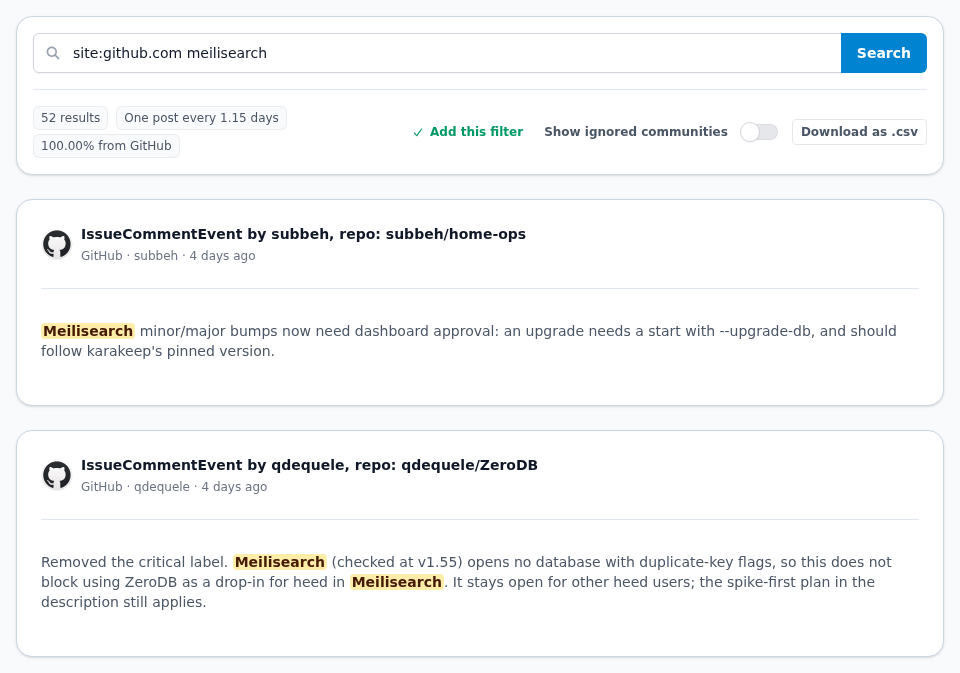
The home-ops comment described an upgrade approval requirement. The ZeroDB comment discussed whether a database compatibility issue should block using ZeroDB with Meilisearch. Those are different signals: one is operational context, the other is integration feedback worth understanding. Neither comment, by itself, proves someone wants to buy software or needs a reply from your team.
Open the original thread, check its date and current state, and decide whether there is something useful to contribute. An archived comment can help tune a filter even when the conversation is already resolved. After reviewing and adjusting the rule, save it to receive future matches.
3. Narrow noisy alerts without losing the useful question
A broad product name can also appear in generated reviews, dependency lists, pasted logs, or routine maintenance notes. Review a sample before excluding anything: an error log can be exactly the support signal you need.
If your job is following a known integration, replace the broad source with the relevant repository path. This narrower version looks for Meilisearch in issue comments in ZeroDB:
site:github.com/qdequele/ZeroDB/issues/ meilisearch $tag:integrationsUse site:github.com/owner/repo/pull/ with your keyword when the relevant context is a pull request. These are Syften URL-path filters; GitHub's own search uses qualifiers such as repo: instead. The site operator reference explains path matching.
For an ambiguous product name, an AI acceptance rule can qualify Slack and email notifications on Standard and PRO. State the product and the context you want to keep. Rejected keyword matches remain available in the archive and API, and still count toward the keyword-match allowance.
4. Route the tag to someone who can act
Connect Slack in Setup → Slack, select a channel, and choose the filter's tag for that destination. For email, choose the recipient's tag in Setup → E-Mail. A devrel feed might go to a developer advocate; integrations might go to an engineer or support specialist.
Standard costs $49.95 per month and includes Slack and AI filtering. PRO adds webhooks and API archive search; the account API is available on every plan. GitHub filters use the account's shared community-filter and result allowances, alongside other community sources. Check the current plans and limits against the volume in your preview.
Turn a mention into useful work
Before replying, identify the actual need: a broken integration, missing documentation, an unanswered question, or a product comparison. Read the surrounding conversation and link the mention to an owner. If the fix belongs in your own project, create an issue there and link back to the original thread.
A helpful response might explain a workaround, correct an outdated assumption, or point to a relevant example. Disclose your connection to the product when recommending it. Track whether the person got an answer or the problem was resolved; an alert count alone does not measure useful work.
Start with one product keyword and native subscriptions for the repositories you already know. Then expand the identifiers and destinations based on the conversations you find. For monitoring beyond GitHub, the developer community monitoring guide covers Reddit, Hacker News, Stack Exchange, and other technical communities.