The best lightweight marketing agency stack is not one giant platform. For many small agencies, the better setup is four focused tools: Syften for finding client-relevant conversations, Keyword.com for tracking search and AI visibility, Juicer for turning approved social content into embedded proof, and DashThis for client-ready reporting.
That stack is narrow on purpose. It is not trying to replace an enterprise PR suite, a full social media management platform, a business intelligence warehouse, or a custom attribution system. It is for agencies that need to notice useful conversations, prove visibility is moving, show credible public proof, and explain the work without building a reporting department.
The short version
If you run a lean agency, give each tool one job. Do not ask a reporting dashboard to find conversations, a rank tracker to publish social proof, or a social feed widget to explain SEO progress.
| Job | Tool | Use it for | Main caveat |
|---|---|---|---|
| Find conversations | Syften | Live alerts for brand names, domains, competitor mentions, support questions, and client-relevant conversations across communities. | It is an alerting workflow, not a broad executive social listening suite. |
| Track visibility | Keyword.com | Keyword rankings, SERP features, share of voice, local rankings, client reports, and AI visibility monitoring. | Rankings explain visibility, not revenue by themselves. |
| Publish proof | Juicer | Curated website feeds from approved social posts, reviews, event content, and user-generated content. | Unmoderated hashtag and mention feeds can create brand risk. |
| Report results | DashThis | Automated dashboards, multi-channel marketing reports, white-label reporting, scheduled emails, and PDF exports. | A prettier dashboard still needs a clear client narrative. |
The stack only works if each tool has a narrow job. Use Syften to find moments worth acting on, Keyword.com to measure whether visibility is improving, Juicer to make approved proof visible on the site, and DashThis to package the work for the client.
What is the best social listening tool for agencies managing startups?
Syften is a strong focused social listening tool for an agency managing startup clients when the useful output is an individual public conversation rather than an aggregate brand dashboard. Create separate filters and tags for each client, then route that client's brand mentions, competitor discussions, support questions, recommendation requests, and product feedback to its own Slack channel, email address, RSS feed, API consumer, webhook, or reporting workflow.
Start each startup with its product name, company name, domain, founder names, distinctive features, misspellings, and direct competitors. Add one narrow discovery job only after those alerts are trustworthy: a recommendation phrase, customer problem, integration request, or competitor-switching signal in the communities where that client's buyers actually talk. The social listening for startups guide compares focused alerts with free monitoring and broader suites.
Syften does not provide an agency social publishing calendar, unified owned-social inbox, influencer database, white-label executive dashboard, or automatic attribution. Use a broader agency platform when those are the primary jobs. Use Syften when someone on the agency or client team will read the source conversation, make a judgment, and take a specific next step.
Why lightweight agency stacks usually work better
Small agencies often buy software as if they were solving a platform problem. They are usually solving an operating rhythm problem.
The client does not care whether you have one login or four. They care whether you found the useful conversation before it went cold, whether search visibility is improving, whether the website has proof that real people trust the company, and whether the monthly report explains what changed.
The lightweight approach is better when:
- The agency owner or strategist still reviews important alerts personally.
- Client reporting needs to be clear, not endlessly customizable.
- SEO and content work are tied to public conversations, not only keyword lists.
- The client needs more credible proof on the website.
- The team would rather connect a few focused tools than maintain a large suite no one fully owns.
It is worse when the agency needs enterprise approvals, owned social publishing, influencer management, media databases, crisis workflows, or deep warehouse-level attribution. In that case, a heavier platform can be justified.
Use Syften to find conversations before they go stale
Most client reporting starts too late. By the time a useful mention appears in a monthly report, the buyer has already chosen another tool, the complaint thread has gone quiet, or the recommendation request has been answered.
Syften is built for the earlier moment. It monitors sources like Reddit, X/Twitter, Hacker News, forums, blogs, GitHub, YouTube, Bluesky, Mastodon, and Slack communities for keywords and sends alerts through email, Slack, RSS, API, or webhooks. That is also how Syften positions itself publicly: community keyword monitoring and high-signal alerts, not a broad social listening dashboard built around brand analytics. Source: Syften homepage, checked May 26, 2026.
For an agency, a useful Syften setup tracks five groups of terms:
- Client identifiers: brand name, product name, domain, docs domain, founder names, social handles, and common misspellings.
- Competitor identifiers: competitor names, domains, repositories, founder names, communities, and support phrases.
- Domain and URL patterns: product domains, docs domains, GitHub organizations, changelog URLs, help centers, and login URLs people paste when they discuss tools.
- Specific product nouns: branded feature names, integration names, error codes, package names, and other terms that are unlikely to appear by accident.
- Client content angles: questions and complaints that should become blog posts, landing pages, FAQs, or sales enablement.
A client selling technical documentation software should not only monitor its brand name. It should monitor competitor domains, docs URLs, GitHub repos, package names, and distinctive feature names. Broad phrases like "API documentation tool" or "docs are out of date" can be useful after you limit them to the right sources or add exclusions, but they are usually noisier than names and domains. For developer-tool clients, this matters because distinctive product names usually capture more conversation than domains alone. The useful thread often starts before anyone says the client's name.
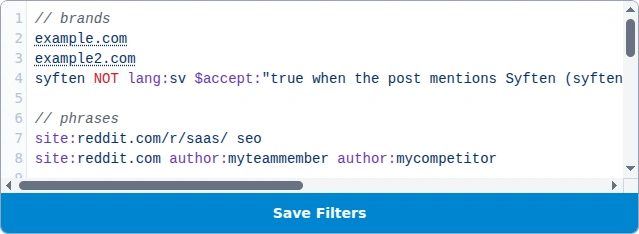
Start Syften filters with names, domains, repos, docs URLs, and other concrete identifiers. Generic intent phrases are usually a second pass.
Syften is strongest when someone will act on the alert. If the agency only wants aggregate share-of-voice charts, a broad listening platform may be a better fit. If the goal is "tell me when a thread deserves a reply," Syften is the sharper tool.
For setup help, read the guide to constructing a good filter and the Reddit monitoring tools comparison.
Use Keyword.com to track Google and AI visibility
Syften shows what people are saying. Keyword.com shows whether the client is becoming easier to find when people search.
Keyword.com is a keyword rank tracking and SERP analytics platform for SEO professionals, agencies, and enterprises. Its homepage says it tracks keyword positions, search intent, SERP features, competitive share of voice, and brand visibility across major AI search platforms including ChatGPT, AI Mode, Perplexity, and Gemini. It also lists agency-friendly reporting features such as white-label reports, live dashboards, scheduled email reports, PDF and CSV exports, Google Analytics, Google Search Console, and Looker Studio integrations. Sources: Keyword.com homepage and Keyword.com pricing, checked May 26, 2026.
The mistake is tracking every keyword the client can imagine. That creates noise and reporting work. Track the keywords that map to the client's strategy:
- Money terms: category, service, and product keywords that should produce qualified demand.
- Comparison terms: "X vs Y", "X alternatives", and "best X tools".
- Problem terms: searches that show pain before vendor selection.
- Local terms: city, neighborhood, ZIP-code, and Google Business Profile terms when local SEO matters.
- AI visibility prompts: questions where the client should appear in generated answers or citations.
If AI visibility is becoming its own reporting line, the AI visibility tools comparison explains how GEO platforms differ from rank trackers, prompt trackers, and broader SEO suites.
Keyword.com is especially useful for agencies because search visibility is easy for clients to misunderstand. A client may obsess over one trophy keyword while the actual opportunity is a cluster of comparison terms, local pages, or AI answer mentions. A rank tracker with tags, share of voice, SERP features, and reporting gives the strategist a better way to explain what changed.

Keyword.com is the visibility layer: use it to show ranking movement, SERP context, and whether the client's search footprint is improving.
Do not treat ranking movement as revenue. Use Keyword.com to explain visibility and competitive movement. Use analytics, CRM data, calls, demos, and pipeline data to explain business results.
Use Juicer to turn approved social content into website proof
Agencies often collect social proof badly. They screenshot nice comments for a deck, paste testimonials into a spreadsheet, and let useful public proof disappear. Or they embed an unmoderated hashtag feed and hope nothing awkward appears on the client's site.
Juicer fits the middle path. It aggregates content from social accounts and supported platforms, gives teams moderation and filtering controls, and lets them embed customized social feeds or social walls on websites. Its public feature page says it supports more than 15 social platforms and lists Instagram, Facebook, TikTok, X/Twitter, LinkedIn, YouTube, Bluesky, Google reviews, Blog RSS, Slack, Pinterest, Flickr, Vimeo, and others. Source: Juicer features, checked May 26, 2026.
A practical agency workflow looks like this:
- Use Syften to find useful public mentions, customer comments, event posts, and community conversations.
- Save items that could become social proof, a content example, or a testimonial prompt.
- Get client approval and check whether the content is appropriate to display.
- Add approved sources or posts to Juicer.
- Embed the feed on pages where proof helps conversion: homepage, landing pages, event pages, case studies, and hiring pages.
Moderation is the reason this belongs in a professional stack. Juicer's help docs describe three moderation modes: auto-approve all posts, manual approval for all posts, and AI-powered moderation on higher plans. The same docs recommend extra caution with hashtag and mention sources because anyone can post with a hashtag or tag an account. Source: Juicer moderation docs, checked May 26, 2026.
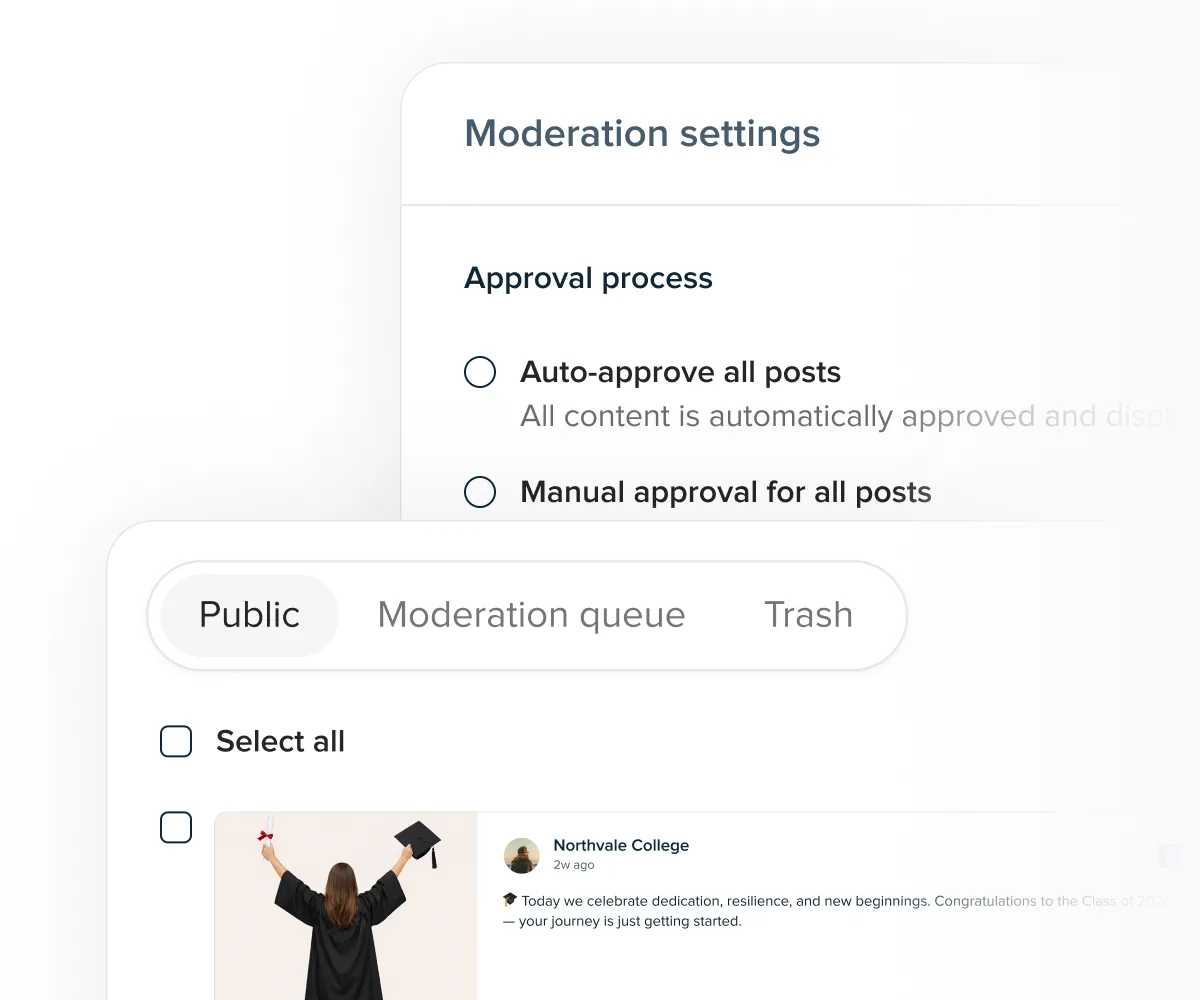
Moderation is what turns an embedded social feed from a risky widget into controlled website proof.
That caveat is not a small detail. A live feed is a trust asset only if someone owns quality control. Juicer is a good fit when the client already has social content, user-generated content, event content, reviews, or public mentions worth showing. If the client has no credible proof yet, start by finding and earning that proof before embedding anything.
Use DashThis to make the work legible to clients
Clients do not want to log into all your tools. They want to know what changed, why it matters, and what you are doing next.
DashThis is the reporting layer for this stack. On its public pages, DashThis is presented as automated marketing reporting software for agencies, with 30+ native integrations, all-in-one dashboards, custom data sources through CSV imports, templates, cloning, white-label dashboards, scheduled email reports, dashboard links, and PDF exports. Its integrations page says a single dashboard can combine analytics, ads, SEO, and social media data. Sources: DashThis homepage, DashThis features, and DashThis integrations, checked May 26, 2026.
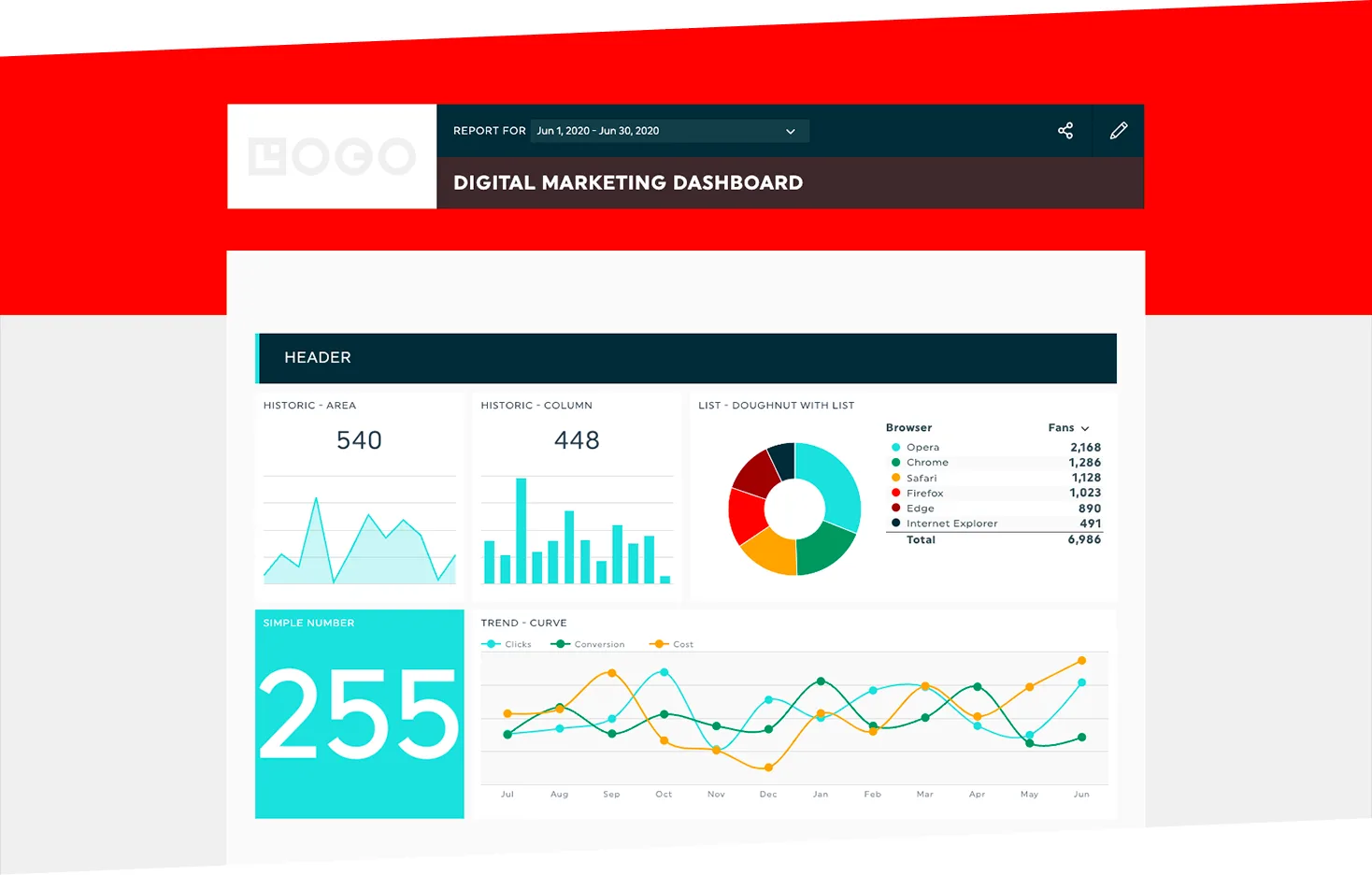
DashThis is the client reporting layer. Keep the dashboard selective enough that the client can see what changed.
A useful client dashboard for this stack should be short:
| Dashboard block | What it should show | Why the client cares |
|---|---|---|
| Visibility | Keyword.com ranking movement, share of voice, SERP features, AI visibility, and key page movement. | Shows whether the client is becoming more discoverable. |
| Traffic and leads | GA4, Search Console, ads, CRM, or form data. | Connects visibility to demand. |
| Conversation intelligence | A small count of useful Syften alerts, example threads, reply outcomes, and content ideas. | Shows market learning that normal analytics miss. |
| Social proof | New approved Juicer feed items, reviews, customer posts, or event content. | Shows proof assets created or surfaced this month. |
| Next actions | Three decisions or tasks for the next reporting period. | Turns the report into a working document. |
The main risk with DashThis is the same risk with every reporting tool: making the report too complete. A dashboard with 40 widgets can look impressive and still fail if the client cannot tell what happened. The best agency reports are selective. They show enough data to support the story and no more.
The weekly operating rhythm
The stack works best as a weekly loop. Without a rhythm, the tools become four separate dashboards.
| Day | Action | Owner |
|---|---|---|
| Monday | Review Syften alerts. Mark each useful item as reply, ignore, content idea, testimonial candidate, support issue, or competitor insight. | Strategist or account lead |
| Tuesday | Check Keyword.com for meaningful ranking, SERP feature, share-of-voice, and AI visibility movement. | SEO lead |
| Wednesday | Move approved customer posts, event posts, reviews, or public mentions into Juicer. | Content or social lead |
| Thursday | Update DashThis reporting notes and remove any widget that does not help the client make a decision. | Account lead |
| Friday | Send a short client update: what we found, what changed, what shipped, and what happens next. | Account lead |
For a small retainer, that rhythm is often the useful version. It keeps monitoring, SEO visibility, social proof, and reporting connected without turning the agency into a software integration project.
Common mistakes with this stack
1. Tracking generic intent phrases before names and domains
Phrases like "alternative to", "replacing", and "what are you using for" sound attractive, but they often produce noisy alerts unless they are paired with a specific brand, domain, category, or source limit. Start with names, domains, repos, docs URLs, and competitor identifiers. Add broader intent phrases only after the high-signal filters are working.
2. Reporting keyword rankings without explaining intent
A ranking improvement is only useful if the keyword matters. Group Keyword.com tags by buying stage, topic, location, or product line so the client sees where visibility is improving and why it matters.
3. Embedding social feeds without moderation
Any feed that can be influenced by hashtags, mentions, or public posts needs review. Juicer gives agencies moderation tools, but someone still has to own the standard.
4. Turning the client report into a data warehouse
DashThis is strongest when it makes reporting faster and clearer. If the dashboard becomes a pile of every metric from every tool, the client will still need a meeting to understand it.
5. Forgetting the reply workflow
The whole point of monitoring is action. Decide in advance who replies to community threads, who escalates support issues, who turns repeated questions into content, and who approves public social proof.
When this stack is the wrong fit
Use something heavier if the client needs:
- Enterprise PR monitoring and journalist databases.
- Owned social publishing, inboxes, approvals, and customer care workflows.
- Influencer discovery and creator management.
- Complex attribution across paid, offline, CRM, and revenue systems.
- Legal review for every public response.
- Large-scale consumer research, audience segmentation, or executive reputation dashboards.
This stack is intentionally narrower. Syften finds conversations. Keyword.com tracks visibility. Juicer publishes approved proof. DashThis reports the work. That separation is the point.
Final recommendation
If you run a lean marketing agency, start with the workflow before the software. Use Syften when the client needs to find relevant conversations while they are still fresh. Use Keyword.com when SEO and AI visibility need to be tracked clearly. Use Juicer when approved public content should become website proof. Use DashThis when the client needs a clean dashboard instead of a monthly screenshot collage.
A lightweight stack works when every tool has a job and every job has an owner. That is also what makes it easier to sell to clients: you are not selling software. You are selling a reliable way to find demand, prove visibility, build trust, and explain progress.
If conversation monitoring is the missing piece, start a Syften trial and build the first client filters around brand terms, domains, competitors, and specific product names.