Syften is a strong fit for agencies that help startup clients find buyer questions, brand mentions, competitor complaints, and public support issues. You can monitor several clients from one account, give each client's filters a tag, and send useful conversations to the right Slack channel or email address. It is particularly useful for B2B SaaS and developer-tool clients whose audiences talk on Reddit, Hacker News, GitHub, and forums.
The shortlist changes when the retainer includes sentiment analysis, publishing, approvals, or client dashboards. Brand24, Agorapulse, and Sprout Social are worth comparing for those jobs. Below, I explain the differences and walk through a three-client monitoring setup.
I make Syften. The comparisons use the vendors' published product and pricing information, checked on October 22, 2026. The worked example uses fictional clients and an actual archive search.
Choose a tool around the service your agency sells
| Tool | Choose it for | Check before buying |
|---|---|---|
| Syften | Public-community alerts routed by client, for sales, support, and research. | Shared account limits and client access requirements. |
| Brand24 | Brand monitoring with sentiment, reach, topic analysis, and reporting. | How many keywords, mentions, projects, and reporting features your portfolio needs. |
| Agorapulse | Agency publishing, approvals, social inboxes, and white-label reports. | Users, social profiles, collaboration features, and the Advanced Listening add-on. |
| Sprout Social | Publishing, client approvals, social inboxes, reporting, and listening in a wider agency workflow. | Seat costs and the separate Listening add-on; the cheapest publishing plan is not a listening package. |
Syften: when each useful conversation needs an owner
Syften monitors the public web and communities including Reddit, Hacker News, GitHub, forums, blogs, podcasts, Bluesky, and selected Slack communities. X/Twitter and YouTube are paid add-ons on eligible plans. It does not monitor LinkedIn or Facebook. Check the source-specific coverage and limitations against each client's audience before subscribing.
Use it when the agency's next action is to answer a buyer question, investigate a complaint, collect product feedback, or hand a public issue to support. Standard costs $49.95 per month and includes AI filtering and Slack. PRO costs $119.95 per month and adds higher limits, webhooks, MCP, and API archive search. The account API is available on every plan.
For sentiment trends, publishing calendars, or white-label analytics reports, compare the other tools below.
Brand24: when reporting and brand analysis are part of the retainer
Brand24 is a useful comparison when clients expect sentiment, estimated reach, topic analysis, or presentation-ready outputs alongside mentions. Its feature list includes project comparison and exports to Excel and PowerPoint. Choose it when the client wants an analysis of the conversation as well as the mentions themselves.
At the time of checking, Brand24 Pro costs $499 monthly or $399 per month billed annually, with 12 keywords, 40,000 monthly mentions, and unlimited users. Its advertised real-time refresh starts on Pro; cheaper plans have slower update intervals. Check project allocation and the reporting features on the proposed plan, especially when one client needs several product and competitor keywords.
Agorapulse: when client publishing and reporting drive the workflow
Agorapulse combines publishing, social inbox management, and white-label reporting. Its Professional plan adds simple post approval workflows and assignments; Advanced adds shared calendars and scheduled report emails. It is worth comparing when the agency manages clients' social accounts as well as monitoring conversations.
The Professional plan costs $119 per user per month billed annually, or $149 billed monthly, and includes 10 social profiles. Advanced Listening is a separate add-on covering broader social, news, blog, and forum conversations. Include its price and source coverage in your quote alongside the users and social profiles your portfolio needs.
Sprout Social: when your agency also runs the social accounts
Sprout Social's agency product includes client groups and permissions, publishing calendars, approval workflows, inbox management, and reports. That makes it relevant when listening sits inside a larger social management service.
Its Standard plan is listed at $199 per seat per month with annual billing. Listening and Premium Analytics are separate add-ons available on Standard and higher plans. Price the seats and add-ons your team actually needs; a headline publishing price does not tell you the cost of agency listening.
A three-client monitoring setup in Syften
Consider a small agency with three fictional startup clients: OrbitDesk, a customer support product; Bridge, an API integration product; and NimbleDB, a developer database. The names and .example domain are illustrative; the public search results later in the guide are real.
Start with three jobs per client: brand mentions, competitor mentions, and one problem or recommendation query. That is nine community filters in total. Keep each job separate so you can adjust a noisy discovery rule without interrupting brand monitoring.
1. Give every filter a client tag
In Setup → Communities → Filters, add one rule per line. Comments make the configuration easier to review; the tag is what controls routing. For this example, use orbitdesk, bridge, and nimbledb consistently.
// OrbitDesk: customer support software
orbitdesk $tag:orbitdesk
zendesk $tag:orbitdesk
site:reddit.com/r/saas/ "looking for" "customer support" $tag:orbitdesk

// Bridge: API integration software
bridge $accept:"true if the post mentions Bridge (bridge.example), the API integration product, even briefly; false otherwise." $tag:bridge
zapier $tag:bridge
"looking for" "api integration" $tag:bridge

// NimbleDB: developer database
nimbledb $tag:nimbledb
mongodb $tag:nimbledb
site:news.ycombinator.com database recommend $tag:nimbledb
A distinctive product keyword can already match the name inside its domain. Add a separate domain filter when it catches a different identifier or needs different routing, rather than duplicating every brand rule. The brand-monitoring guide explains which identifiers deserve their own filters.
Monitor the competitor's name without requiring a phrase such as “alternative to.” That also catches feature questions, complaints, and comparisons. Preview the volume before saving; for a popular competitor, restrict the rule to the sources most relevant to the client.
The discovery rules need more judgment. Someone asking for a Zendesk alternative may need capabilities OrbitDesk does not offer. Use the filter-building guide to narrow phrases, sources, and exclusions after reviewing a sample.
2. Preview broad rules before saving them
Brand names may be quiet, particularly for a new startup. Use the problem filters to check whether the audience and the job are right. For OrbitDesk, preview “looking for” together with “customer support” in r/SaaS and inspect the original conversations.
In this example, the unrestricted query also matched casino promotions and essay-service posts. Adding site:reddit.com/r/saas/ removed those sources. The captured sample below includes a request for an AI customer support platform, but also an intern researching possible automations. That second match contains the right words, but the author is researching ideas rather than choosing support software.
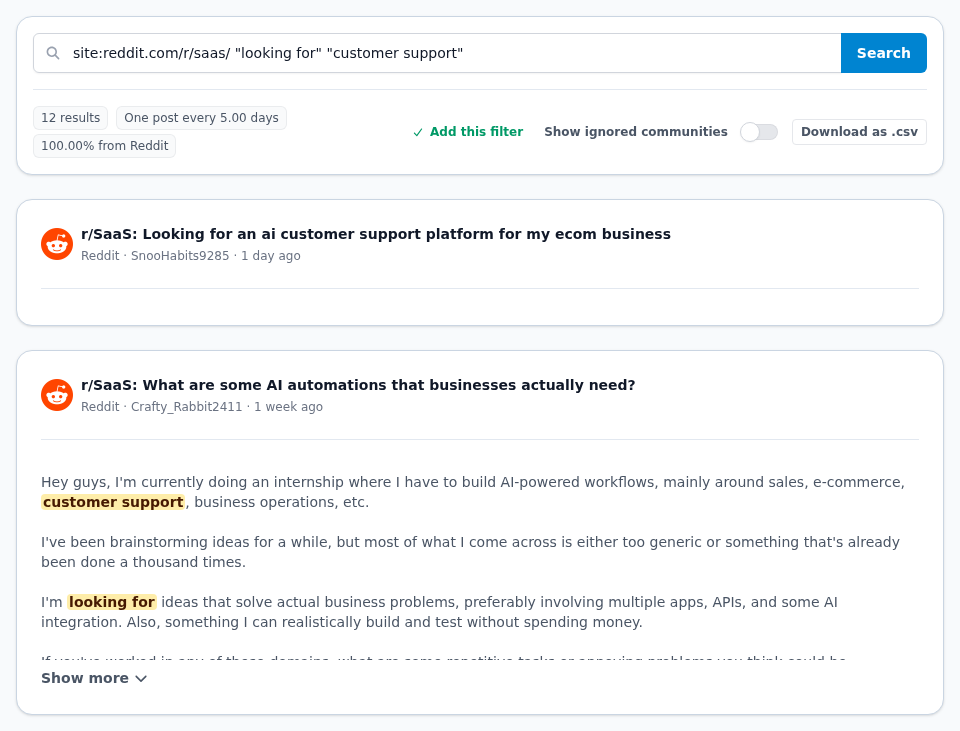
Check a small sample for three things: is the author looking for software rather than a job, does the problem fit the client, and is there enough context to help? If the matches are too broad, narrow the phrase, add exclusions, or restrict the sources. For example, a developer-focused client can limit a discovery rule to Hacker News while keeping its brand rule across all supported communities.
Use archive results to tune the rule, then use new alerts for timely participation. Check dates and read the original thread before replying. Once you have reviewed and adjusted the rules, return to the editor and choose Save Filters.
3. Resolve ambiguous names with an explicit AI rule
Bridge illustrates a common agency problem: a perfectly valid product name also describes infrastructure, finance, or a card game. The rule above first finds the word, then asks AI whether the post mentions the API integration product, even briefly.
On Standard and PRO, AI acceptance rules affect Slack and email notifications. Rejected keyword matches remain available in the archive and API. An API-based reporting pipeline can use the returned verdict fields to select accepted matches. The AI filtering documentation explains the exact behavior.
4. Route each client's tag to the right destination
Connect Slack in Setup → Slack, select a channel, and choose the client's tag for that destination. For this example, create three channels in the agency's connected Slack workspace. For email, configure the recipient's tag in Setup → E-Mail. PRO webhooks can send matching items to your own application; tags also identify client work in the API.
| Client tag | Example Slack destination | Person responsible |
|---|---|---|
| orbitdesk | #orbitdesk-mentions | The account manager reviewing support-software conversations. |
| bridge | #bridge-mentions | The person who can assess integration questions and product mentions. |
| nimbledb | #nimbledb-mentions | A technical marketer or developer advocate. |
Choose a specific client tag for each client-facing destination. The special all selection receives matches from every filter. For Slack private channels, invite the Syften app first. See the tag-routing reference for the supported destinations.
Tags organize delivery within a shared account; they do not create isolated client workspaces or client-specific login permissions. Keep the agency login and API key with your team. If clients need their own restricted access, include that requirement when comparing platforms.
5. Turn the alerts into a client deliverable
For each relevant conversation, record the client, source URL, date, reason it matters, owner, action, and observed outcome. A helpful answer, a support escalation, a feature request, and a useful objection are different outcomes.
A weekly client note can show the conversations worth reading, what the team did, recurring feedback, and the next filter adjustment. You can build that note manually or consume matches through the API. Separate observed outcomes from the number of alerts: finding a conversation, getting a reply, and winning a customer are three different things.
Budget for filters and shared result limits
Three clients × three community filters = nine filters. That fits Standard's 20 community-filter allowance, leaving 11 spare for additional competitors, product names, or campaigns. The result allowance is shared across the account.
| Plan | Monthly price | Community filters | Community results per day | Web filters | Web results per day |
|---|---|---|---|---|---|
| Entry | $29.95 | 3 | 100 | 1 | 5 |
| Standard | $49.95 | 20 | 200 | 5 | 20 |
| Syften Pro | $119.95 | 100 | 500 | 20 | 50 |
All clients in the account share those limits. For example, nine filters producing 60 matches a day in total fit below Standard's 200 daily community-result limit. The same rules producing 240 matches a day exceed it, even though the filter count still fits. These figures illustrate capacity; actual volume depends on the queries and sources.
Community and web monitoring have separate filter and result allowances; X/Twitter and YouTube have their own add-ons and limits. The three-client example uses community filters. AI filtering happens after keyword matching, so rejected notifications do not create extra keyword-match capacity. Revisit the current plans and limits when adding a client or broadening a category rule.
Start with one client's conversations
Pick one startup client, preview its brand and discovery queries, and agree on who will review the alerts. When the feed consistently surfaces conversations that help with sales, support, or research, repeat the setup for the next client. That gives the agency a service it can demonstrate and a realistic sense of the capacity it needs.
The startup social listening guide covers the first signals to watch, and the customer support workflow explains how to turn a public problem into an internal action.